
PESCO Bill Payment Methods – A Complete Step-by-Step Guide
Last updated: – Updated to reflect latest PESCO payment methods and channelsPESCO bill payment can be done by several online and offline methods, including mobile banking apps, digital wallets like Easypaisa and JazzCash, ATM payments, and payments at bank branches. This page is a guide that explains how to Pay PESCO bill online and offline, step by step, along with practical tips to avoid payment issues or delays. To pay your bill you need to know your 14-digit Reference Number.
Before making a payment, you can verify your reference number, latest bill amount and due date on our PESCO Online Bill page. The bill details are retrieved from the official PITC billing portal used by distribution companies.
Note: This page provides informational guidance on PESCO bill payment methods. It does not collect, process, or confirm payments.
Official PESCO Bill Payment Methods
There are several authorized channels through which PESCO Bill can be paid. Consumers may choose any methos for according to their convenience.
Following are the most commonly used PESCO bill payment methods:
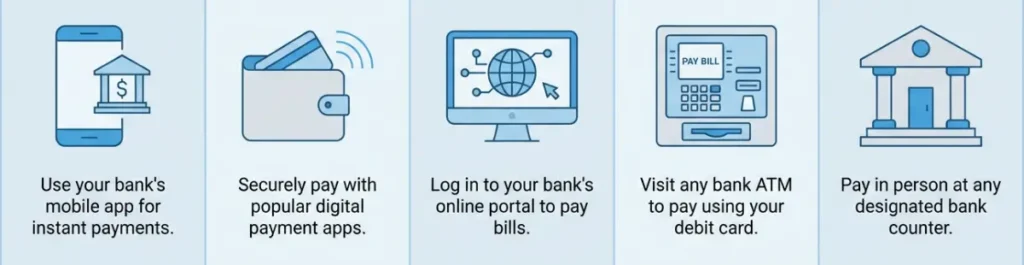
The 14 digit Reference Number printed on every PESCO Electricity Bill copy is required for all payment methods. Make sure entry of correct Reference number before going through the transaction process.
Payment Method |
Online/Offline |
Processing Time |
Require 14-Digit Reference No. |
|
Mobile Banking |
Online |
Instant |
Yes |
|
Easypaisa / JazzCash |
Online |
Instant |
Yes |
|
Internat Banking |
Online |
Instant |
Yes |
|
ATM |
Offline |
Instant |
Yes |
|
Bank Branch |
Offline |
Same Day |
Yes |
Online PESCO Bill Payment Through Mobile Banking
Mobile banking is one of the easiest ways to complete your PESCO bill payment online. All the mainstream banks in Pakistan provide utility bill payment services through mobile apps. This makes you pay your electricity bill conveniently and securely from your smartphone, whether you are at home or anywhere else.
Steps to Pay PESCO Bill Through Mobile Banking App
- Download and install your bank’s mobile app from Google Play store or Apple App store
- Login into the app by entering username and password
- Navigate to the “Bill Payment” or “Utility Bills” section
- Click electricity and choose PESCO from the list of companies
- Enter the 14 digit Reference Number
- Verify the bill amount displayed on screen
- Complete the payment and save the receipt
Popular banks that provide PESCO bill payment facility through their official mobile apps include
- HBL (HBL Mobile)
- UBL (UBL Omni)
- Allied Bank (myABL)
- MCB (MCB Mobile banking)
- Bank Alfalah (Bank Alfalah Mobile App)
- Askari Bank (Askari Mobile)
The mobile banking app generates a bill payment receipt after successful transaction, which should be saved for your records.
PESCO Bill Payment via Easypaisa or JazzCash
Popular digital wallets Easypaisa and JazzCash, both provide free of charge services PESCO bill payment using the wallet balance from your smartphone.
Steps to pay PESCO Bill via Easypaisa
- -Open the Easypaisa app on your mobile phone
- Log into your account
- Choose bill payment from the menu
- Select Electricity and choose PESCO
- Enter 14-digit reference number
- Review the displayed bill amount
- Confirm the transaction using your secret PIN
Steps to Pay PESCO Bill via JazzCash
- Open the JazzCash app on your smartphone
- Log in your account
- Tap on Pay bills
- Choose Electricity and then select PESCO
- Type your 14-digit bill reference number
- Verify the bill amount shown on your screen
- Confirm the payment through your MPIN
Digital receipts are usually generated quickly, confirming the payment by both methods. Always save a screenshot of the receipt as proof and personal record.
Internet Banking for PESCO Bill Payment
Consumers can pay their PESCO bill online through their internet banking accounts.
Steps to Pay PESCO Bill Through Internet Banking
- Open your banks’ official website on your device
- Log in your internet banking account
- Go to Bill Payments section
- Select Utility Bills / Electricity and choose PESCO
- Enter your 14-digit Reference Number and press enter
- Confirm you bill amount on screen
- Confirm payment through OTP or PIN
- Download and save the payment receipt
PESCO Bill Payment Through ATM
If you like offline payments you can make PESCO Bill Payment through your nearest ATM machine of an authorized bank’s branch.
Steps to Pay Bill at an ATM
- Insert your Debit Card into the ATM machine
- Enter your PIN code
- Select Bill Payments / Utility Bills
- Choose Electricity and select PESCO
- Enter your 14-digit reference number
- Review the bill amount on ATM screen
- Complete the transaction and collect receipt
Paying PESCO Bill at Bank Branches
You can also pay PESCO electricity bill at any of the authorized bank branches by presenting:
- Printed PESCO bill copy
- 14-digit Reference Number
The bank cashier processes the payment and provides you with a stamped receipt, which is usually a portion of bill. You should always keep as proof of payment and for personal record.
PESCO Bill Due Date & Late Payment Surcharge
On every bill copy Due Date clearly along with amounts Payable within Due Date and Payable after Due Date. It is important to be aware of the due date and complete the payment till that date to avoid additional charges called Late Payment Surcharge (LPS).
What Happens When You Miss The Due Date
If the bill remains unpaid beyond the Due Date, an increased amount mentioned in the Payable after Due Date becomes applicable. This includes the Late Payment Surcharge (LPS) added to the original amount. You can learn more about how slab rates and charges are calculated on our PESCO Tariff and Units page.
This is carried forward to the next month bill if it remains unpaid. Extended delays in payments may also affect the continuity of electricity service.
Can You Pay After the Due Date?
Yes, you can pay the bill after due date. However, you have to pay the full Payable After Due Date amount, which includes the surcharge.
Before making a late payment, check your updated payable amount on our PESCO Online Bill page.
Can You Extend the Due Date?
In certain circumstances PESCO allows consumers for a short period of extension of the bill due date. It needs to be approved by concerned authorities. If you need an extension visit your nearest PESCO office or call on PESCO Helpline for guidance. Extension of date depends on the amount to be paid.
How to confirm PESCO Bill Payment Status
After making PESCO bill payment you may want to know if the payment is successfully processed. You can verify payment status by one of the following ways:
- Most of the online payment options such as Mobile Banking apps, Easypaisa, and JazzCash generate a confirmation receipt immediately after the transaction is completed. Most of these apps also show a payment history from where bill payment status can be confirmed.
- In internet banking you also receive a Transaction ID, which can be used as proof in case of any payment dispute and the transaction details are sent in an email to the consumer.
- Check your Duplicate bill on PESCO Bill Online page and confirm if the outstanding amount status has been updated as Paid.
- Call PESCO Helpline and confirm payment from a customer service representative.
It may take up to 24 hours after transaction completion for the bill payment status to be updated in the system. If your payment status is not updated or you face any issue, you can visit our Help & Complaints page for further guidance.
FAQs
Can I pay my PESCO bill without a printed bill copy?
Yes, you can pay your PESCO bill without a printed copy by using your 14-digit Reference Number through mobile banking apps, Easypaisa, JazzCash, ATM, or internet banking services.
Can I pay my PESCO bill after due date?
Yes, payment can still be made after the due date; however, a late payment surcharge is usually added to the payable amount.
What should I do if my payment fails?
If your payment fails, verify that the Reference Number is correct and ensure sufficient balance in your account. Check whether the amount was deducted. If the issue persists, contact your bank’s customer support or the PESCO Helpline for guidance.
What happens if I do not pay my PESCO bill?
If the bill remains unpaid beyond the due date, a late payment surcharge is applied. Continued non-payment may result in temporary disconnection of electricity supply according to PESCO regulations.
Can I extend my PESCO bill due date?
In certain cases, consumers may contact their local PESCO office to inquire about possible due date extensions, subject to applicable policies and approval.
Last Updated: March 2026