PESCO 8118 Complaint Number – How to Register an Electricity Complaint Online
If you are a PESCO electricity consumer facing issues like overbilling, power outage, meter fault, or illegal connection, registering a PESCO complaint has never been easier. Our website PESCO Online Bill brings you a complete step-by-step guide on how to use the PESCO 8118 complaint number and submit your PESCO complaint online, without visiting any office, through its PESCO Helpline & Complaints page page.
If you want to register a PESCO complaint immediately, send your 14-digit Reference Number via SMS by clicking on the following image.
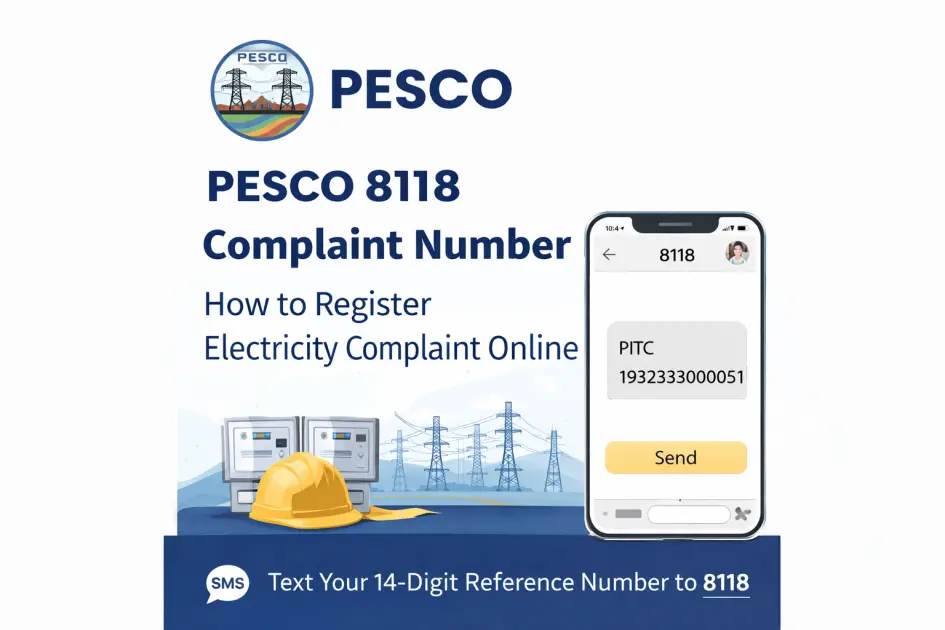
PESCO Complaint number 8118 is the official helpline SMS number launched by Peshawar Electric Supply Company (PESCO) to quickly resolve issues of its consumers in KPK. The 8118 complaint number connects you to the concerned department according to the nature of your complaint.
In this Electricity Guide, we’ll show you exactly how to register your complaint by SMS on your phone, how to track it online, and what to do if your issue remains unresolved. Keep reading to learn how to get your electricity problem fixed fast.
How to Register a Complaint Using the PESCO 8118 Complaint Number
Nobody wants to sit on hold waiting for a customer service agent, especially when the electricity is out during summer in KPK. That’s why PESCO introduced the 8118 SMS complaint service. Consumers can easily send a text message to register their electricity complaint without visiting a PESCO office. Your complaint is registered in the PITC Central Complaint Management System (CCMS).
Here’s how to do it, step by step.
Step 1 – Find Your Reference Number First
Before anything else, grab your latest electricity bill and look for your 14-digit Reference Number. It’s usually printed at the top of the bill. You’ll need this to send your complaint. Without it, PESCO can’t identify your connection.
Step 2 – Type Your SMS
Open your messages app and type it exactly like this:
PITC [Space] 14-Digit Reference Number.
For example: PITC 12345678901234. Keep it simple. No extra words needed.
Step 3 — Send It to 8118
Send your SMS to 8118. That’s it. Standard SMS charges may apply depending on your mobile network.
Step 4 — Wait for Confirmation
You will receive an auto-reply confirming that your complaint has been registered. Relevant PESCO team starts working to resolve your issue as soon as they receive the complaint.
Step 5 — Still Not Resolved?
If your issue drags on without a response, don’t just wait. Follow up by calling the PESCO helpline 118 directly or escalate the matter in writing to PESCO’s concerned department.
What Can You Report via 8118 SMS?
You can report many common electricity problems using the PESCO 8118 complaint number, including:
- Incorrect or excessive electricity bill
- Tripped or faulty electricity meter
- Unexpected power outage
- Damaged transformer
- Low voltage or no power supply
- Illegal electricity connection issues
If the issue affects your electricity connection, the 8118 complaint service is usually the fastest way to report it. If your complaint is related to overbilling or a higher-than-expected amount, you can first use our PESCO Bill Calculator to estimate your electricity charges.
You can also review our PESCO Tariff and units page to understand how electricity charges are calculated on your bill.
Other Ways to Register a PESCO Complaint
In addition to the PESCO 8118 complaint number, PESCO provides several other channels to report an electricity complaint. This allows you file complaints and track their progress.
The following are the additional methods for PESCO consumers to file an electricity issue.
1. Call the 118 Complaint Helpline
Simply call 118 Helpline from your phone to report a problem regarding electricity. This number connects you directly to PESCO’s customer support team. A representative will listen to your issue and register the complaint in the system.
This option is especially useful for urgent problems such as:
- Power outages in your area
- Damaged transformers or poles
- Sudden voltage fluctuations
Keep your 14-digit Reference Number ready when calling, as it helps the support team identify your electricity connection quickly.
2. Register a Complaint Through the PITC CCMS Portal
You can also submit complaints online through the PITC CCMS portal (Central Complaint Management System), which is managed by Power Information Technology Company (PITC) and is used by electricity distribution companies in Pakistan.
Through this portal, you can:
- Register a complaint online
- Provide details about your issue
- Receive a complaint tracking number
- Follow the progress of your complaint
This method is useful for billing disputes, incorrect meter readings, or complaints that require written documentation.
3. Visit Your Local PESCO Office
For complex or ongoing issues, visiting your nearest PESCO Sub-Division Office may be the most effective option. This allows you to discuss the matter directly with the concerned staff and ensure your complaint is properly recorded.
When visiting the office, bring:
- Your latest electricity bill
- Your CNIC
- Any supporting documents related to your complaint
The office staff will register your complaint and provide a tracking reference for follow-up.
3. Send a Complaint by Email
Consumers may also send their complaints via email, especially for non-urgent matters or when supporting documents need to be attached.
When sending an email complaint, include:
- Your Reference Number
- Your contact details
- A clear description of the issue
- Any relevant photos or documents
This helps the concerned department review your case and respond more efficiently.
For a complete list of official complaint channels and how to use them, visit our PESCO Helpline & Complaints page.